Quadtree Find Circle
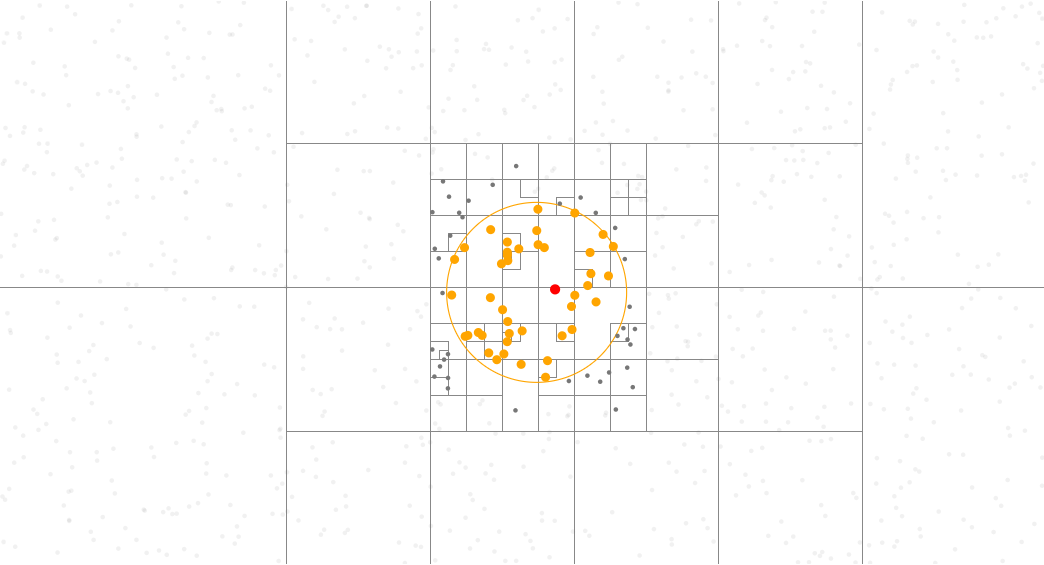
Prepare functions for quadtree
# https://observablehq.com/@d3/quadtree-findincircle
from math import hypot
from random import random
from pathlib import Path
import detroit_live as d3

# https://github.com/bourbonut/detroit-live/blob/main/examples/styles/quadtree-find_circle.css
# Style used later in the example
STYLE_PATH = Path(__file__).resolve().parent / "styles" / "quadtree_find_circle.css"

# Declare the chart dimensions
width = 928
height = 500
radius = 80

# Get quadtree rectangles
def materialize(quadtree):
   rects = []

   def visit(node, x0, y0, x1, y1):
       rects.append({"x0": x0, "y0": y0, "x1": x1, "y1": y1, "node": node})

   quadtree.visit(visit)
   return rects


# find points in a specified circle
def find_in_circle_mark(quadtree, x, y, radius):
   result = []

   def accept(d):
       result.append(d)

   def visit(node, x1, y1, x2, y2):
       if isinstance(node, list):
           if len(node) == 4:
               node.append({"visited": True})
           else:
               node[4]["visited"] = True

           return (
               x1 >= x + radius
               or y1 >= y + radius
               or x2 < x - radius
               or y2 < y - radius
           )

       while True:
           d = node["data"]
           d["visited"] = True
           if hypot(d["x"] - x, d["y"] - y) < radius:
               accept(d)
           node = node.get("next")
           if node is None:
               break

   quadtree.visit(visit)
   return result
Create data and create quadtree
data = [{"x": random() * width, "y": random() * height} for _ in range(1000)]

quadtree = (
   d3.quadtree()
   .x(lambda d: d["x"])
   .y(lambda d: d["y"])
   .set_extent([[-1, -1], [width + 1, height + 1]])
   .add_all(data)
)
Warning
The number of points in this example is 1000. It might be laggy and in this case, this number should be decreased. Performance will be improved in future versions.
Prepare containers and make the quadtree visualization.
html = d3.create("html")
head = html.append("head").append("style").text(STYLE_PATH.read_text())
svg = (
   html.append("body")
   .append("svg")
   .attr("width", width)
   .attr("height", height)
   .attr("viewBox", " ".join(map(str, [0, 0, width, height])))
   .style("cursor", "crosshair")
)

quad = (
   svg.select_all(".node")
   .data(materialize(quadtree))
   .enter()
   .append("rect")
   .attr("class", "node")
   .attr("x", lambda d: d["x0"])
   .attr("y", lambda d: d["y0"])
   .attr("width", lambda d: d["y1"] - d["y0"])
   .attr("height", lambda d: d["x1"] - d["x0"])
)

# Cursor circle
circle = (
   svg.select_all(".radius")
   .data([radius])
   .join("circle")
   .attr("r", lambda d: d)
   .attr("class", "radius")
   .attr("stroke", "orange")
   .attr("fill", "none")
)

point = (
   svg.select_all("circle")
   .data(data)
   .enter()
   .append("circle")
   .attr("cx", lambda d: d["x"])
   .attr("cy", lambda d: d["y"])
   .attr("r", 2)
)
Create event callback and add it to SVG container
def quad_each(_, d):
   node = d["node"]
   if isinstance(node, list):
       if len(node) == 4:
           node.append({"visited": False})
       else:
           node[4]["visited"] = False
   else:
       node["visited"] = False


def point_each(_, d):
   d["visited"] = False


def move(event, _, node):
   x, y = (200, 200) if event is None else d3.pointer(event, node)

   quad.each(quad_each)
   point.each(point_each)

   one = quadtree.find(x, y, radius)
   all_ = find_in_circle_mark(quadtree, x, y, radius)

   def update_quad_class(d):
       node = d["node"]
       visited = node[4]["visited"] if isinstance(node, list) else node["visited"]
       return "node visited" if visited else "node"

   def update_point_class(d):
       return " ".join(
           (
               "visited" if d["visited"] else "",
               "all" if d in all_ else "",
               "find" if d == one else "",
           )
       ).strip()

   quad.attr("class", update_quad_class)
   point.attr("class", update_point_class)

   circle.attr("cx", x).attr("cy", y)


svg.on(
   "mousemove click",
   move,
   extra_nodes=quad.nodes() + point.nodes() + circle.nodes()
)

# Initialize values
move(None, None, None)
Note
In this example, callback is going to be applied on the <svg> element by default.
It means that if there is a change on "mousemove" or "click" event listeners, then only the svg will be updated.
However, explicitely adding extra_nodes = quad.nodes() + point.nodes() + circle.nodes() allows to update all quad, point and circle.
Create an application and run it locally
html.create_app().run()